 E-CommerceSquare WooCommerce Integration: A Step by Step Setup GuideHow to connect Square to WooCommerce with the official plugin, choose a system of record, test in sandbox and fix the sync problems stores hit most often.
Shopify Salesforce Integration for Better Efficiency
How a Shopify Salesforce integration cuts manual work: what it syncs, how to choose a connector, middleware or custom build, and who should own each piece of data.
A Shopify Salesforce integration improves efficiency by moving orders, customers and product data into Salesforce automatically, so nobody has to retype them. Sales, service and marketing then work from the same records Shopify created at checkout. The real gain is not the connection itself. It is a dependable flow of data that matches how your teams actually work.
What does a Shopify Salesforce integration do?
It connects what happens in your store with what your teams do in Salesforce. Shopify data feeds Salesforce records, automation rules, lists, reports and follow-up tasks. Salesforce, in turn, keeps track of customer history, account relationships and where each buyer sits in the life cycle.
For a small store, that can mean syncing new customers and orders and little else. A larger business may need to cover several Shopify stores, Shopify Plus, Sales Cloud, Service Cloud, Marketing Cloud, an ERP, warehouse software, tax data, refunds and complicated account structures. That range is why planning should start with your processes. The connector comes later.
Why cleaner handoffs matter
The biggest payoff is less repeated work and fewer errors. When people copy order details into a CRM, export customer lists for campaigns or match store data to sales data by hand, delays and mistakes follow. A good integration replaces those handoffs with rules that run on their own.
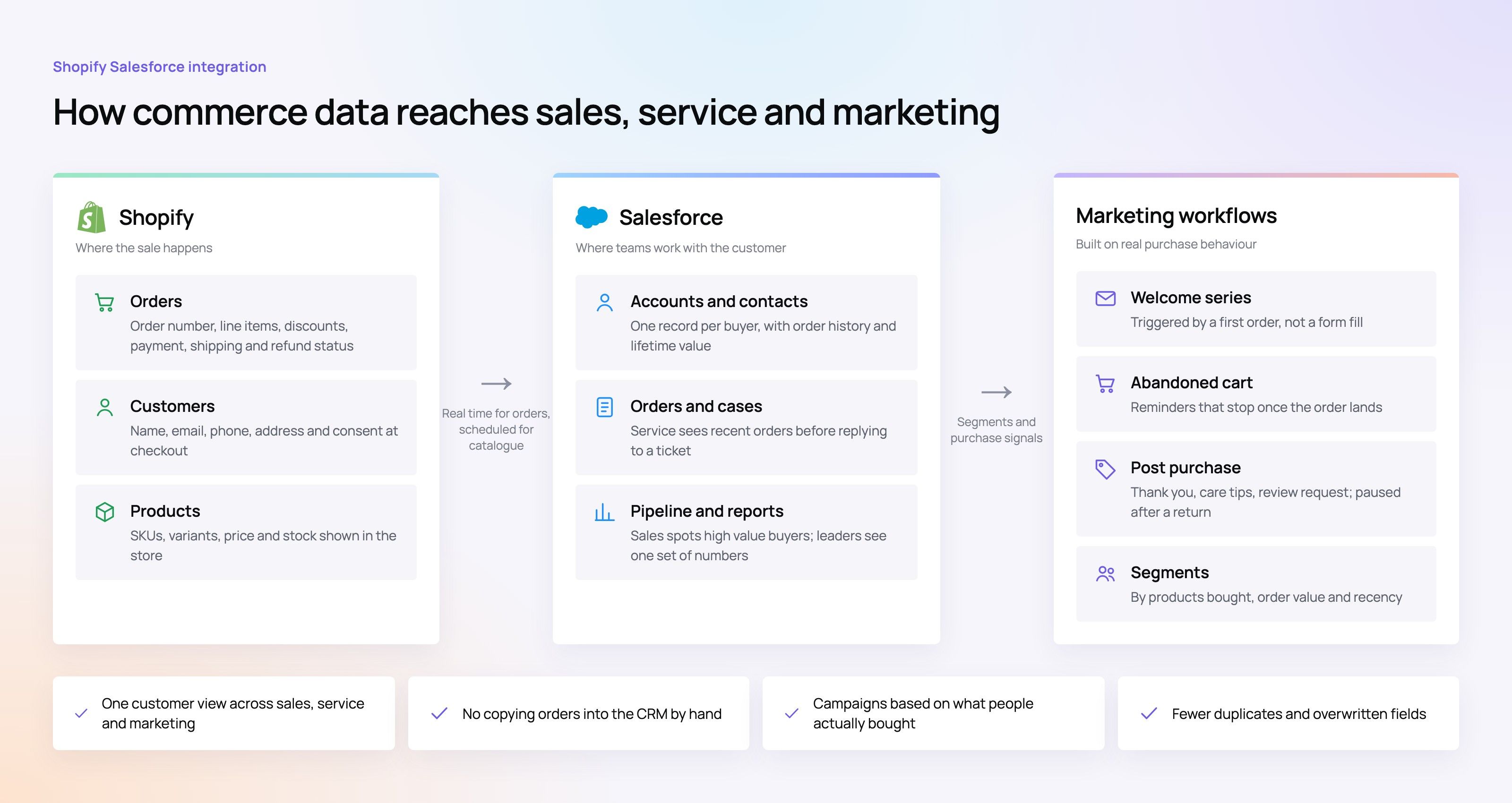
Here is what that looks like day to day. A support agent sees a customer's recent orders before replying to a ticket. A sales rep notices a high value online buyer and plans outreach. Marketing builds lists from real purchase behavior rather than an old spreadsheet. Finance and operations get fewer questions about payments, taxes, refunds and shipping status because each system receives the update it needs.
A typical data map covers five areas:
- Customer records: names, emails, phone numbers, addresses, consent preferences and account relationships.
- Orders: order number, line items, discounts, shipping status, payment status, refunds and returns.
- Products and inventory: SKUs, variants, pricing, stock levels and any product details other teams rely on.
- Marketing activity: purchase history, abandoned cart signals, campaign tags and customer segments.
- Financial details: payment, tax, refund and balance fields where the business needs them.
At this point Salesforce data sync stops being a technical chore. It becomes the basis for quicker decisions and fewer blind spots.
Choosing an integration method
There is no single right method for every business. The choice depends on order volume, how your data is structured, budget, in-house skills and how heavily your Salesforce org has been customized. A small brand may be well served by a simple connector, while a larger operation may need an integration platform or a custom build.
The common options are:
- Prebuilt connectors and third party apps. These are usually the fastest route for standard needs like syncing customers, orders and products. Setup is quick, but they can struggle once your workflows become unusual.
- Integration platforms and middleware. iPaaS tools handle more complex flows, data transformation, logging, retries and work across several systems. They make sense when Shopify, Salesforce, an ERP, fulfillment and marketing tools all have to stay aligned.
- Custom API development. A custom Shopify API integration gives you full control over mapping, triggers, business rules and edge cases. In exchange, someone has to own the code, the documentation and the testing for as long as it runs. Our custom software team builds and maintains these connections.
- ERP first architecture. Some companies put the ERP at the center, especially when it already owns stock, pricing, customer terms or financial balances. Shopify and Salesforce both connect to that single source of truth instead of sending conflicting updates to each other. We see this often with Microsoft Dynamics 365 and Odoo.
For most businesses the answer is a mix rather than a choice between connector and custom. Use standard tools where they fit, write custom logic only where the process demands it, and keep fragile workarounds away from your core rules.
Which Salesforce Shopify integration option fits your business?
The right Salesforce Shopify integration fits the size you are today and leaves room for where you are heading. If your order flow is simple and your Salesforce org is tidy, a connector may be all you need. High volume, multiple brands, B2B accounts, complicated shipping or many custom objects usually point toward middleware or custom work.
Use this table as a starting point before you shortlist tools:
| Business situation | Likely fit | What to watch |
|---|---|---|
| Small team syncing basic customers and orders | Prebuilt connector | Field limits, duplicate handling and upgrade path |
| Growing brand with marketing automation needs | Connector plus workflow automation | Consent, segment rules and campaign data quality |
| Several stores or Shopify Plus | Middleware or an advanced connector | Store mapping, brand rules and consistent reporting |
| B2B or account based selling | Custom mapping or iPaaS | Contacts, accounts, price lists, terms and ownership conflicts |
| Operations run from an ERP | ERP first integration | Stock accuracy, financial fields and master data rules |
Shopify Plus Salesforce integration deserves extra attention here. Shopify Plus supports more advanced commerce, but it does not fix a weak CRM design. You still have to decide which system owns customer records, how orders appear in Salesforce and what happens when something goes wrong.
Data ownership matters more than data movement
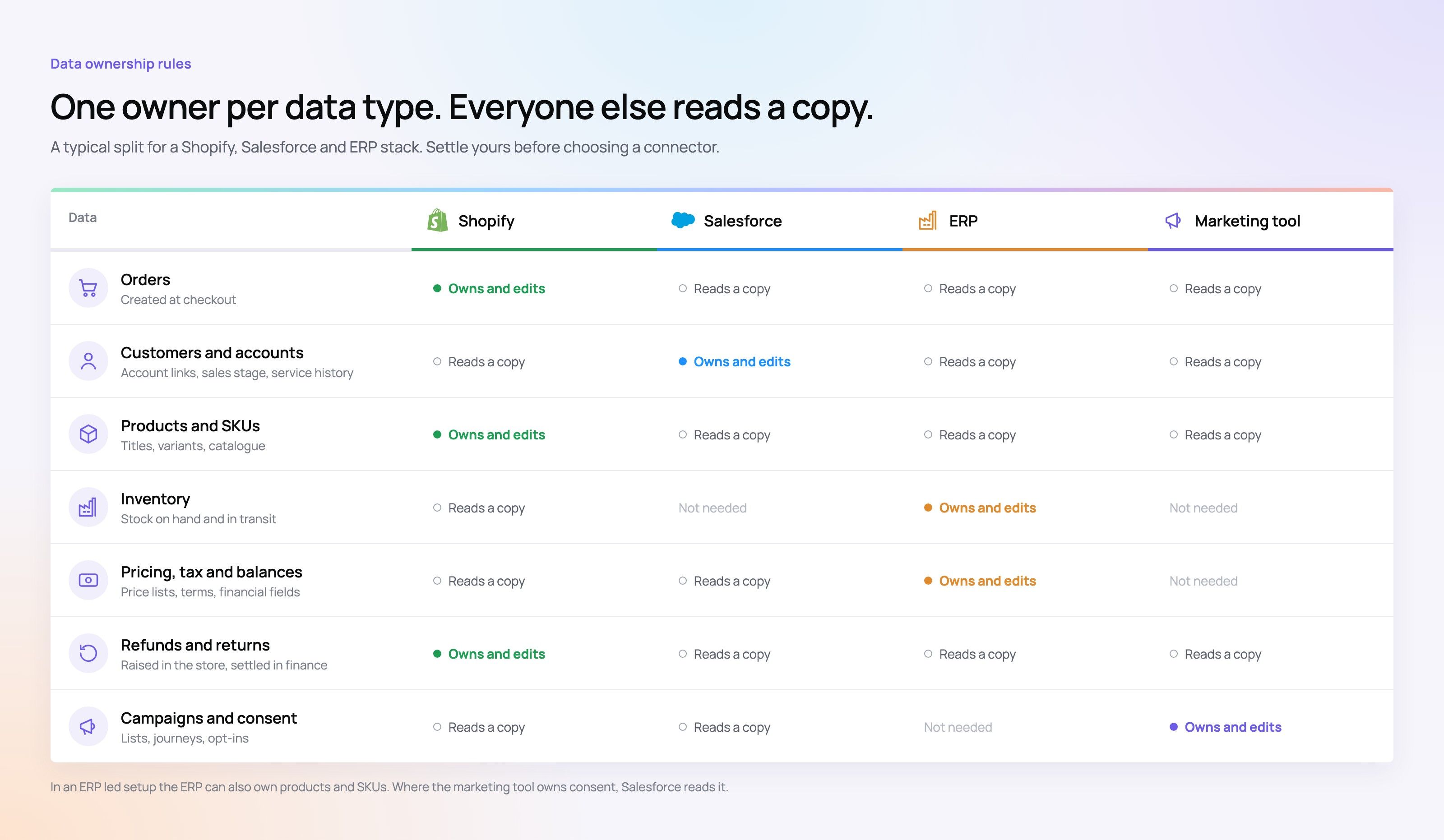
A frequent mistake in Shopify CRM integration projects is assuming more data is always better. Syncing too much, or syncing without rules, creates duplicates, overwrites important fields and fires automations at the wrong moment. Before you connect anything, name the source of truth for each type of data.
Shopify usually owns order data because it sits closest to the sale. Salesforce tends to own account relationships, sales stages, service history and life cycle fields. An ERP may own stock, pricing, tax and financial balances. Marketing Cloud or another marketing platform may own campaigns and consent, depending on your setup.
A short governance checklist saves a lot of cleanup later:
- Name the system of record for every object and field.
- Decide whether each sync runs one way or both ways.
- Separate real time events from batch updates.
- Set rules for duplicates, guest checkouts, merged accounts and changed email addresses.
- Write down what happens when a sync fails.
- Assign people to monitoring, updates and troubleshooting.
With these rules in place, the integration is far easier to maintain, because everyone knows which system wins when records disagree. If you are bringing customer data into Salesforce for the first time, treat it as a CRM migration before you turn on the sync.
Growth brings exceptions
In a demo, every integration looks simple. A customer places an order, it shows up in Salesforce, and that is the end of it. Real commerce is messier. Items get returned, shipments get split, products sell out, taxes and discounts change, and guest buyers later create accounts.
As volume grows, these cases start to affect service quality and the accuracy of your reports. A support agent needs to know whether an order was refunded, partly shipped or replaced. A sales rep needs to know whether a customer buys regularly or bought once. Marketing needs to avoid sending a cheerful upsell email to someone who just returned an item.
A solid Shopify integration with Salesforce plans for all of this. That can mean exception queues, retry logic, alerts, manual review steps or status mappings that reflect how your orders really move. Sometimes it also means choosing a scheduled batch over real time sync because the batch is safer and more stable.
How do you keep the integration reliable after launch?
Treat it as a live system rather than a project that ends at go live. After launch you need monitoring, clear owners, documentation, testing and a process for handling new fields, apps, automations, stores and Salesforce customizations.
Check regularly for failed syncs, duplicate records, outdated mappings and automations behaving oddly. A Shopify app that changes checkout data, or a Salesforce admin who adds a required field, can break the flow overnight. Without monitoring, those problems quietly damage reports, customer service and revenue.
A steady maintenance routine includes:
- Daily or weekly sync review: look at failed jobs, queue backlogs and high priority errors.
- Change control: review Salesforce field changes, Shopify app updates and workflow edits before they reach production.
- Data quality checks: watch for duplicate contacts, missing order fields, mismatched SKUs and conflicting customer IDs.
- Exception reporting: give business users a view of the records that need a human to look at them.
- Sandbox testing: try new mappings, automations and schema changes before rolling them out.
- Clear escalation paths: name who owns connector settings, APIs, middleware, Salesforce automation and Shopify configuration.
This matters even more with custom APIs. A custom build can serve you well for years, as long as its logic is documented and not locked inside one developer's head.
Practical advice for a smoother project
A good integration starts with the business, not the technology. Developers can build the connection, but business teams have to define what correct data looks like, which flows matter most and which edge cases are acceptable. The more of this you settle upfront, the fewer surprises you get after launch.
Before any build work, bring in people from ecommerce, sales, service, marketing, finance and operations. Ask each team what data they need, when they need it and what they will do with it. Then focus on the flows with obvious value, such as faster support replies, sharper customer segments, fewer manual updates or easier finance reconciliation.
Rules we find useful on these projects:
- Start with the most important objects instead of syncing everything at once.
- Keep field mapping clear and written down.
- Use unique IDs wherever you can to prevent duplicate records.
- Plan for returns, cancellations and guest checkout from day one.
- Avoid firing Salesforce automation on every minor store update.
- Set up dashboards or alerts for failures rather than waiting for users to notice.
- Review the integration whenever order volume, product range or team structure changes.
The best projects are rarely the flashiest. They keep data consistent, support the daily routine and make growth less chaotic. If HubSpot or Mailchimp is your CRM or email platform instead, read our guides to the HubSpot Shopify integration and the Mailchimp Shopify integration.
How Codeeo can help
Salesforce and Shopify make a strong pair when the integration is designed around real workflows. Connectors, middleware, ERP first setups and custom APIs all have their place, and the right one depends on your size, volume and governance needs. Start by agreeing on data ownership, mapping the key records and finding the handoffs that cause the most friction today.
Codeeo has delivered more than 200 projects across the UAE and the US, with a team of over 80 people in Dubai, Riyadh and Karachi. Our Shopify developers and sales automation specialists can scope the work with you. Talk to us about your current stack and where it slows your teams down.
Frequently asked questions
The plan comes first.
Map your key workflows, the data objects that matter most and which system owns each field. Only then compare prebuilt connectors, middleware, an ERP first setup or custom code.
E-CommerceSquare WooCommerce Integration: A Step by Step Setup GuideHow to connect Square to WooCommerce with the official plugin, choose a system of record, test in sandbox and fix the sync problems stores hit most often. E-CommerceDo You Need a Business License to Dropship in the US?Do you need a business license to dropship? What US sellers need: a local business license, a state seller's permit, an EIN, and when you might not need one.
 E-CommerceLiquor Store POS Systems: Key Features and BenefitsWhat a liquor store POS system should do: age verification, case and bottle inventory, reordering, reporting and compliance, plus how to choose one.
Tell us what the business needs. We will tell you what to build first.
Schedule a free consultation and get a written recommendation, with costs, before you commit to anything.
Get in touchPROVEN RESULTS
4.7 / 5verified reviews on Google